01 · SCAN
Whole-site crawl
Point it at a domain, not a URL. We read your sitemap, scan up to 250 pages in batches, and group findings by page so you can see which templates are repeating the same mistake.
Free · up to 250 pagesWCAG 2.2 · ADA · EAA · Section 508 · AODA
We scan your pages, then hand you the exact line to change: the broken markup on the left, the corrected markup on the right. Copy it, ship it, rescan. No widget, no overlay, no consultant on retainer.
Free. No account. ~9 seconds. Full report on screen. No email wall in front of your results.
What lands on your screen
Expand any issue below. You get the failing element, the corrected element, the WCAG success criterion it maps to, and a plain sentence on who it breaks for.
Issues found
14 total
44 checks mapped to WCAG 2.2 success criteria
Found on your page
<button class="cart-btn">
  <svg class="icon-cart">…</svg>
</button>
Change it to
<button class="cart-btn"
        aria-label="Open cart, 2 items">
  <svg class="icon-cart"
       aria-hidden="true">…</svg>
</button>
Who this breaks. A screen reader announces this as “button.” Nothing else. Someone shopping without sight has no way to know it is the cart, and this is the single most common failure we find on e-commerce checkouts.
Found on your page
<span class="lbl">Email</span>
<input type="email"
       placeholder="Email">
Change it to
<label for="email">Email</label>
<input type="email" id="email"
       autocomplete="email">
Who this breaks. Placeholder text disappears the moment someone types, and it is not read as a label. Users with memory or attention disabilities lose the field meaning mid-entry; voice-control users cannot say “click Email” at all.
Found on your page
.footer-note {
  color: #9AA0A6;   /* 2.6:1 */
  background: #FFFFFF;
}
Change it to
.footer-note {
  color: #5F6670;   /* 5.8:1 ✓ */
  background: #FFFFFF;
}
Who this breaks. Low-vision users, anyone over about 50, and every person reading your site outdoors on a phone. This is the most-cited failure in ADA demand letters because it is trivially provable in a screenshot.
Found on your page
<h2>Plans</h2>
  <h4>Starter</h4>
  <h4>Growth</h4>
Change it to
<h2>Plans</h2>
  <h3>Starter</h3>
  <h3>Growth</h3>
Who this breaks. Screen reader users navigate by pulling up a headings list. It is their table of contents. A skipped level reads as a missing section. Search crawlers parse the same structure, which is why this fix tends to pay you back twice.
The part nobody puts on a homepage
This category has a credibility problem, and it was earned. Overlay widgets that promise instant compliance have been the subject of regulatory action and are opposed by much of the disability community. Certificates get sold as legal shields they are not. We would rather be the boring, verifiable option.
The build
01 · SCAN
Point it at a domain, not a URL. We read your sitemap, scan up to 250 pages in batches, and group findings by page so you can see which templates are repeating the same mistake.
Free · up to 250 pages02 · FIX
Every finding comes with the failing markup on the left and the corrected markup on the right, plus the WCAG criterion it maps to and a plain sentence on who it breaks for. Copy it, ship it, rescan.
44 checks · WCAG 2.203 — CHECK
Contrast, alt text, heading structure, typography, colour blindness, cookie banners and a HIPAA web-surface check. No account, no email wall, results on screen.
All free · no signup04 · PROVE
A VPAT built against all 87 WCAG 2.2 criteria, prefillable from a live scan, and an accessibility statement written to be honest about partial conformance rather than overclaiming.
VPAT · statement generatorFree tools · no account
Real WCAG 2.2 maths, running in your browser. Nothing is sent anywhere.
Six-digit hex, with or without the #
Large text, 24px and up
Body text at 15px. If this is hard to read against its background, that is exactly the point of the number below.
Where this is enforced
Nearly all of these laws point back to the same technical standard: WCAG. What changes is who is covered, which conformance level applies, and what the deadline was.
WCAG 2.2
Global · W3C
The technical standard the rest of this list is built on. Level AA is the practical target almost everywhere.
ADA Title III
United States · Private sector
Civil rights law with no bundled technical spec. Courts have consistently reached for WCAG to fill the gap.
Section 508
United States · Federal
Covers federal agencies and anyone selling to them. This is where a VPAT stops being optional.
EAA / EN 301 549
European Union
Applies to private-sector digital products and services, with the compliance date already behind us.
AODA
Ontario, Canada
Level AA required, with per-day penalties on the books for organisations that fall out of compliance.
Equality Act
United Kingdom
Frames accessibility as a reasonable adjustment. WCAG AA is the accepted benchmark for meeting it.
From the blog
Automated accessibility scanners catch about 30-40% of WCAG issues. The rest – reading order problems, missing context, confusing announcements, broken live regions,…
Your wp-config.php file contains your database username and password in plain text. It holds your authentication keys and salts. It controls debug…
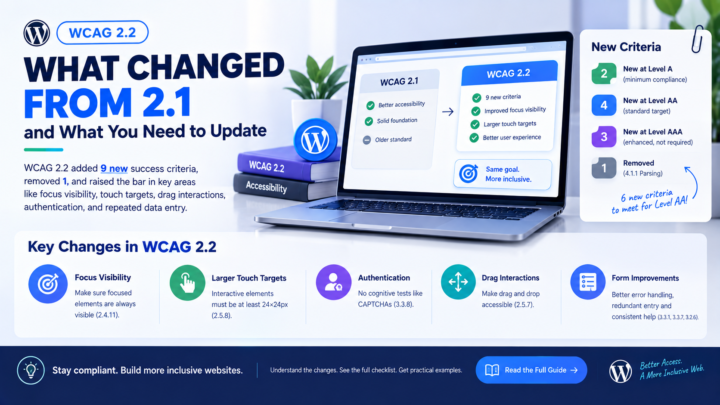
WCAG 2.2 became a W3C Recommendation in October 2023, replacing WCAG 2.1 as the current standard. If your site targets WCAG 2.1…
One URL. Nine seconds. No account, no card, no call.