Best WordPress Security Plugins Compared (2026)
 By Admin
10 min read
By Admin
10 min read 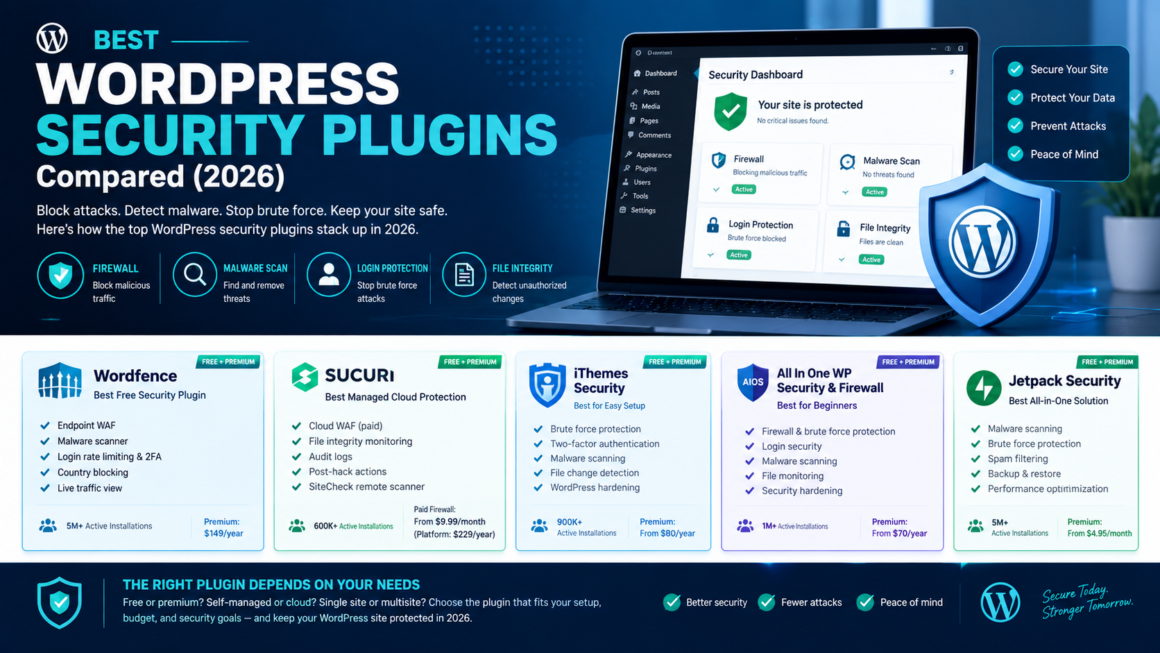
Over 11,000 new WordPress vulnerabilities were recorded in 2025, a 42% increase year over year. The median time from vulnerability disclosure to mass exploitation is around 5 hours. By the time you read about a new CVE in a newsletter, automated bots have already started scanning for unpatched sites.
A good security plugin doesn’t make WordPress unhackable; nothing does. What it does is cover the four layers that stop the vast majority of attacks: a firewall to block malicious requests, a scanner to catch malware if something gets through, login protection to stop brute-force attacks, and file integrity monitoring to alert you when something changes. This guide compares the best WordPress security plugins in 2026- honestly, what’s actually free, what’s behind a paywall, and which one fits your specific setup.
What a WordPress Security Plugin Actually Does (and Doesn’t)
Before comparing options, it’s worth understanding the four core layers these plugins provide:
Web Application Firewall (WAF). Sits in front of your site and blocks malicious requests SQL injection, cross-site scripting, known exploit patterns before they reach WordPress. Two types: endpoint (runs on your server, sees full request context, uses server resources) and cloud/edge (filters traffic before it hits your server, zero server impact, but costs more).
Malware scanner. Scans files and database for known malicious code. Some run locally on your server (Wordfence). Others run in the vendor’s cloud (MalCare, Sucuri SiteCheck), which is lighter on your hosting but has less visibility into file changes.
Login protection. Brute-force limiting, two-factor authentication, CAPTCHA, login URL changes. Stops the most common automated attack vector.
File integrity monitoring. Compares your WordPress core, plugin, and theme files against known-good versions and alerts you when something changes. This is how you catch infections early before visitors see a fake CAPTCHA overlay or a redirect to a spam site.
No single plugin replaces good fundamentals: strong passwords, timely updates, no nulled plugins, proper file permissions. But the right plugin catches what fundamentals miss.
The Five Plugins Worth Considering
1. Wordfence: Best Free Security Plugin
Active installations: 5 million+ Free tier: Endpoint WAF, malware scanner, login rate limiting, 2FA, country blocking, live traffic view Premium: $149/year (real-time firewall rules, real-time malware signatures, priority support)
Wordfence is the most widely installed WordPress security plugin, and the free tier is genuinely powerful stronger than most competitors’ paid plans. The endpoint firewall runs inside WordPress, which gives it full request context (it sees logged-in user state, the exact plugin handling the request, POST bodies). The scanner compares core files, plugins, and themes against the WordPress.org repository and flags modifications.
Strengths:
- The free tier includes a real firewall, not just hardening. Most competitors paywall their WAF.
- 2FA built in; no separate plugin needed.
- Malware scanner with file-change detection catches infections early.
- Massive threat intelligence network: Wordfence’s team publishes vulnerability research actively.
Trade-offs:
- Scans run on your server. On cheap shared hosting, a full scan can spike CPU and slow the site. On VPS or managed hosting, this isn’t an issue.
- Free firewall rules are delayed by 30 days behind premium. For most sites this is fine; for high-value targets it’s a gap.
- The dashboard is feature-dense not overwhelming, but not minimal either.
Best for: Most single-site owners. If you install one security plugin and nothing else, this is the one.
2. Sucuri: Best Managed Cloud Protection
Active installations: 600,000+ Free plugin: File integrity monitoring, audit logs, blocklist monitoring, security hardening, post-hack actions, SiteCheck remote scanner Paid firewall: From $9.99/month (cloud WAF + CDN). Platform plans from $229/year (firewall + malware cleanup + monitoring)
Sucuri operates differently from Wordfence. Its real power is the cloud WAF, a DNS-level firewall that filters traffic before it reaches your server. That means zero performance impact on your hosting, DDoS protection, and virtual patching for known vulnerabilities. The trade-off: the WAF is a separate paid subscription; the free plugin alone is an auditing and hardening toolkit, not a firewall.
Strengths:
- Cloud WAF has zero impact on server resources, ideal for high-traffic sites or weak shared hosting.
- Platform plans include unlimited malware cleanup with a guaranteed response time. If you get hacked, Sucuri cleans it for you.
- Virtual patching blocks exploitation of known plugin vulnerabilities at the WAF layer, even before the plugin author ships a fix.
- CDN included with the firewall, so you get performance benefits alongside security.
Trade-offs:
- The free plugin does not include a firewall. This is the catch nobody mentions: the free Sucuri plugin is monitoring and hardening only. If you want the WAF, you’re paying.
- DNS change required to route traffic through Sucuri’s network. Straightforward, but not instant.
- Less granular WordPress-level visibility than Wordfence’s endpoint approach.
Best for: E-commerce sites, agencies managing client sites, and any site that’s been hacked before and wants managed protection with cleanup included.
3. MalCare: Best for Low-Impact Scanning
Active installations: 500,000+ Free tier: Cloud-based malware scan (detection only) Premium: From $149/year (one-click malware removal, firewall, login protection, uptime monitoring)
MalCare’s differentiator is that scanning happens entirely in MalCare’s cloud. It copies your files to their servers, scans there, and reports back. Your hosting server is never burdened by the scan. This makes it the best choice when you’re on resource-limited hosting where Wordfence would cause performance issues.
Strengths:
- Zero server load during scans.
- One-click malware removal in the premium tier genuinely works for common infections without manual file editing.
- Clean, simple dashboard. Good for site owners who aren’t developers.
- Built-in staging environment to test cleanup before applying to production.
Trade-offs:
- Free tier is detection only; it tells you there’s malware but doesn’t remove it unless you upgrade.
- The cloud approach means less real-time visibility into file changes compared to Wordfence’s local monitoring.
- Firewall is premium-only.
Best for: Site owners on shared hosting who need scanning without the CPU hit, and non-technical owners who want one-click cleanup.
4. Patchstack: Best for Vulnerability-First Protection
Active installations: 100,000+ Free tier: Vulnerability alerts for your installed plugins and themes Premium: From $99/year (virtual patching, auto-protection for known CVEs)
Patchstack takes a different approach: rather than scanning for malware after infection, it focuses on preventing exploitation of known vulnerabilities. Patchstack maintains the largest public WordPress vulnerability database and pushes virtual patches to its WAF within hours of a CVE disclosure, often before the plugin developer ships a fix. In a landscape where the median time from disclosure to mass exploitation is 5 hours, that speed matters.
Strengths:
- Virtual patching is genuinely fast, often same-day for critical CVEs.
- Public vulnerability database and active research team (they run a bug bounty program).
- Lightweight, no heavy scanning, minimal server impact.
- Good for agencies: multi-site dashboard with centralized vulnerability visibility.
Trade-offs:
- Not a full security suite: no malware scanner, no login hardening, no 2FA. It’s a WAF and vulnerability layer, not an all-in-one.
- Smaller install base means less community documentation.
- You’ll still need a companion plugin for login protection and scanning.
Best for: Agencies and developers who already handle basics (2FA, strong passwords) and want the fastest vulnerability-to-patch pipeline.
5. All-In-One Security (AIOS): Best Free Hardening
Active installations: 1 million+ Free tier: Login lockdown, 2FA, user account security, firewall rules, file change detection, database security, brute-force prevention Premium: From $70/year (malware scanning, smart 404 blocking, country blocking)
AIOS is the best-value free hardening plugin. It covers login protection, basic firewall rules, file permissions, database prefix changes, and security scoring, all without paying. The interface uses a security “grading” system that walks you through hardening steps.
Strengths:
- Generous free tier with more hardening features for free than most competitors.
- User-friendly interface with a security-score dashboard.
- Login lockdown and 2FA in the free tier.
- File change detection alerts you to modifications.
Trade-offs:
- Free version has no malware scanning. AIOS free hardens and protects but doesn’t detect existing infections.
- No public bug bounty program; new threats reach it later than Wordfence or Patchstack.
- The firewall is basic compared to Wordfence’s endpoint WAF.
Best for: Budget-conscious site owners who want comprehensive hardening for free and are willing to pair it with a separate scanner.
One Important Update: Solid Security / iThemes Is Being Sunset
If you’re currently running Solid Security (formerly iThemes Security), you need to know this: in May 2026, its parent company Liquid Web folded SolidWP into Kadence Security. They’ve committed to critical security patches for the absorbed brands only through April 2027. After that, it’s unclear whether the plugin continues to receive updates.
If you’re on Solid Security, start planning a migration to one of the five plugins above. Don’t wait until patches stop a security plugin that stops receiving rule updates is worse than no plugin, because it creates a false sense of protection.
Which One Should You Install?
Rather than ranking them 1–5, here’s the honest decision tree:
Single site, capable hosting (VPS, managed WordPress)? → Wordfence free. The endpoint WAF and scanner are the most complete free offering. Add Cloudflare’s free tier as an edge layer for DDoS protection.
Single site, cheap shared hosting? → MalCare (cloud scanning, no CPU hit) or AIOS free (hardening) + Cloudflare free.
E-commerce or high-traffic site? → Sucuri paid platform. The cloud WAF, CDN, and included cleanup justify the cost when downtime means lost revenue.
Agency managing multiple client sites? → Patchstack (centralized vulnerability dashboard + fast virtual patching) + Wordfence on each site for scanning.
Budget is zero? → Wordfence free on capable hosting. AIOS free on shared hosting. Either way, pair with Cloudflare’s free DNS proxy.
One rule that applies to everyone: never install two full security suites simultaneously. Running Wordfence + Sucuri + Cloudflare WAF means three sets of firewall rules fighting each other, conflicts, false positives, broken forms, and slower admin. Pick one endpoint layer, optionally add one edge layer (Cloudflare), and stop there.
What a Security Plugin Doesn’t Replace
A plugin is one layer. The other layers are your responsibility:
- Keep WordPress, plugins, and themes updated. Outdated software is the number-one entry point.
- Delete unused plugins and themes. Deactivated plugins can still be exploited.
- Use strong, unique passwords on every admin account.
- Enable 2FA; most of the plugins above include it; if yours doesn’t, add WP 2FA.
- Never use nulled (pirated) plugins or themes. They are a primary malware vector.
- Set correct file permissions (644 for files, 755 for directories, 600 for
wp-config.php). - Back up daily and store backups off-server. A clean backup turns a hack from a multi-day disaster into a single restore.
For the complete prevention and recovery framework, see the WordPress security guide and the step-by-step hacked site cleanup walkthrough.
WordPress Security Plugins FAQ
Is Wordfence free enough, or do I need premium?
For most single sites, free is enough. Premium adds real-time firewall rules (free rules are delayed 30 days) and real-time malware signatures. If your site handles payments or sensitive data, premium is worth it. For a blog or brochure site, free covers the threat model.
Does Sucuri’s free plugin include a firewall?
No. The free plugin is monitoring, auditing, and hardening. The cloud WAF is a separate paid subscription starting at $9.99/month.
Can I use Cloudflare and Wordfence together?
Yes, and it’s a strong combination. Cloudflare acts as the edge/DNS layer (DDoS protection, bot filtering, caching). Wordfence acts as the endpoint layer (application-level firewall, malware scanning, login protection). They serve different functions and don’t conflict.
What happened to iThemes Security?
It was rebranded to Solid Security, then in May 2026 folded into Kadence Security by parent company Liquid Web. Critical patches are committed only through April 2027. Plan to migrate.
Do I need a security plugin on managed WordPress hosting?
Managed hosts (Kinsta, WP Engine, Cloudways) include server-level firewalls, malware scanning, and automatic updates. A lightweight plugin for 2FA, login limiting, and file monitoring still adds value, but you don’t need a heavy all-in-one suite. Wordfence free or AIOS free is enough alongside managed hosting’s built-in protection.
Will a security plugin slow my site?
Endpoint plugins (Wordfence) use server resources during scans. On VPS or managed hosting, the impact is negligible. On cheap shared hosting, it can cause CPU spikes. Cloud-based options (MalCare, Sucuri WAF) have zero server impact. Choose based on your hosting tier.
Pick One and Configure It Today
The best WordPress security plugin is the one you actually install, configure, and keep updated. If you’re starting from zero: install Wordfence free, enable 2FA, run a scan, and set up login rate limiting. That single action puts you ahead of the majority of WordPress sites. For the full hardening checklist, start with the complete WordPress security guide.
This article is general guidance based on publicly available information as of August 2026. Plugin features, pricing, and ownership can change verify current details on each vendor’s official site before purchasing.