Healthcare Website Accessibility: ADA, HIPAA & Section 504 Compliance (2026)

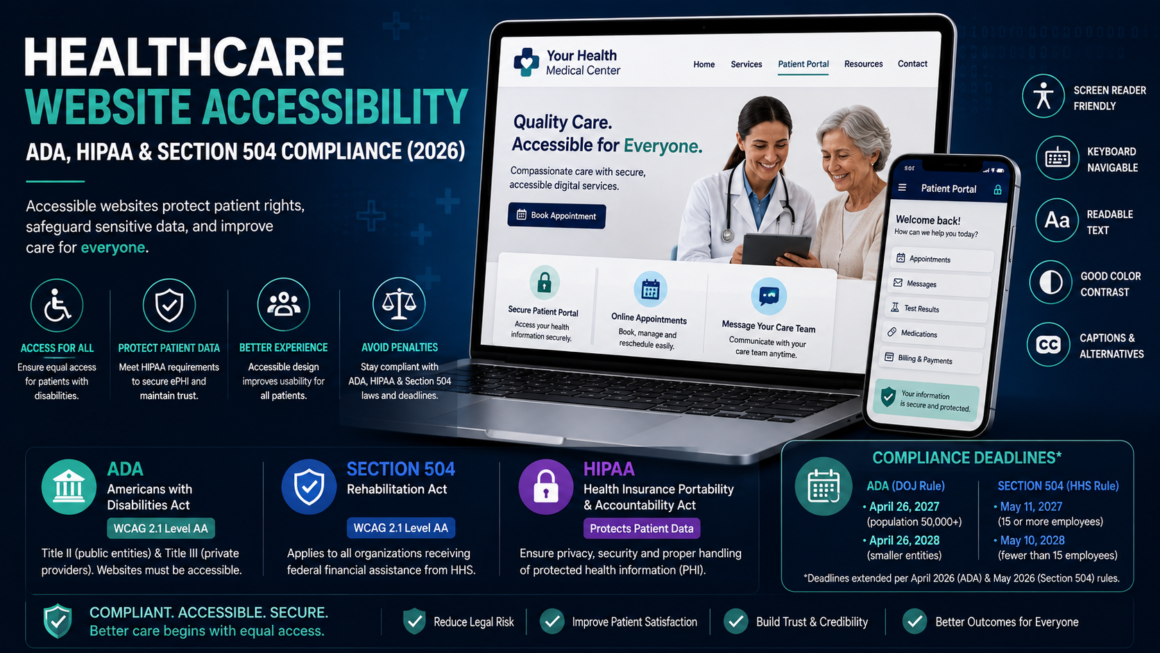
Healthcare website accessibility is where two completely different compliance regimes collide — and most organizations are only watching one of them. HIPAA protects patient data. ADA and Section 504 protect patient access. A website can be perfectly HIPAA-compliant and still discriminate against patients with disabilities because they can’t navigate a portal, read a form, or book an appointment.
This guide covers what healthcare website accessibility actually requires in 2026: the three overlapping laws, the deadlines (updated after the May 2026 extensions), the specific digital surfaces that get audited, and where data protection and access requirements intersect. Run a quick check on any healthcare site with the HIPAA Website Risk Check.
Why Healthcare Website Accessibility Faces Three Laws, Not One
Healthcare organizations don’t face a single accessibility standard — they face three laws, each with its own enforcement path. Getting this landscape wrong is where most compliance programs start to fail.
ADA (Americans with Disabilities Act)
Title II covers state and local government healthcare entities — public hospitals, county health departments. Title III covers private healthcare providers as “places of public accommodation.” Courts have consistently ruled that websites are covered, and healthcare is one of the most actively litigated sectors.
The DOJ’s 2024 ADA Title II rule adopted WCAG 2.1 Level AA as the technical standard. Compliance deadlines were extended in April 2026 to:
- April 26, 2027 — entities serving populations of 50,000 or more.
- April 26, 2028 — smaller entities and special districts.
The standard did not change — only the dates.
Section 504 of the Rehabilitation Act
This is the big one for healthcare. Section 504 covers every organization that receives federal financial assistance from HHS — which means any provider that accepts Medicare or Medicaid. That’s virtually every hospital, clinic, community health center, and most private practices in the country.
The HHS Section 504 final rule (published May 2024, effective July 8, 2024) requires WCAG 2.1 Level AA for all web content, mobile apps, patient portals, digital forms, kiosks, and telehealth platforms. Compliance deadlines were extended by the May 2026 Interim Final Rule to:
- May 11, 2027 — recipients with 15 or more employees.
- May 10, 2028 — recipients with fewer than 15 employees.
A critical point most summaries miss: the 15-employee threshold determines your deadline, not whether you’re covered. An 8-person practice accepting Medicaid is fully subject to the rule — it just has until 2028 instead of 2027.
The underlying non-discrimination obligation has been in effect since July 8, 2024. The extension moved only the WCAG 2.1 AA conformance deadline. Patients can file complaints about inaccessible digital services right now.
HIPAA (Health Insurance Portability and Accountability Act)
HIPAA’s Privacy Rule, Security Rule, and Breach Notification Rule govern how protected health information (PHI) is collected, stored, transmitted, and disclosed. HIPAA doesn’t mention accessibility — it’s a data-protection framework, not an access framework. But the two intersect in ways that create real compliance gaps when organizations treat them as unrelated.
Where HIPAA and Healthcare Website Accessibility Collide
Here’s why you can’t treat data protection and access requirements as separate workstreams.
Patient portals
A patient portal stores and transmits ePHI, so it must meet HIPAA’s Security Rule: access controls, encryption, audit logging, authentication. But it also must be usable by patients with disabilities under Section 504 — keyboard navigable, screen-reader compatible, with labeled form fields, sufficient contrast, and descriptive error handling.
A portal that’s HIPAA-secure but inaccessible effectively denies care access to patients with disabilities. A portal that’s accessible but leaks PHI through unencrypted connections or third-party tracking scripts violates HIPAA. You need both.
Online forms and intake
Digital intake forms collect PHI — medical history, insurance information, demographic data. Under HIPAA, that data must be encrypted in transit and access-controlled. Under WCAG, those same forms must have proper labels, logical tab order, visible focus indicators, descriptive error messages, and sufficient time to complete before session timeout.
The WCAG failures that hit healthcare forms hardest:
- No form labels (SC 4.1.2) — screen readers announce “edit text” with no context for what to enter. This affects 51% of home pages according to the WebAIM Million report.
- Insufficient timeout warnings (SC 2.2.1) — a portal that logs out after 5 minutes with no warning or extension fails both usability and accessibility.
- CAPTCHA without an accessible alternative — if your form uses a visual CAPTCHA with no audio or logical alternative, patients who are blind cannot submit it.
Telehealth platforms
Telehealth is now a core service delivery channel. Under Section 504, telehealth platforms operated by or on behalf of funded providers must be accessible: video controls operable by keyboard, screen-reader-compatible chat, captioned audio, accessible scheduling, and usable interfaces at 200% zoom.
Under HIPAA, telehealth platforms must encrypt video and audio, authenticate participants, and maintain audit logs. A third-party telehealth vendor is a business associate and must sign a BAA.
Third-party vendor responsibility
This is where most healthcare organizations carry the greatest exposure. Under the HHS Section 504 rule, the funded provider is responsible for the accessibility of third-party platforms made available to patients — not the vendor. If your scheduling system, payment processor, or telehealth platform is inaccessible, you’re the one out of compliance.
The practical response: include WCAG 2.1 AA requirements in vendor contracts, require an Accessibility Conformance Report (VPAT) from every digital vendor, and test vendor-provided interfaces yourself rather than taking “we’re compliant” at face value.
Healthcare Website Accessibility: The WCAG Requirements That Matter Most
Not every WCAG criterion weighs equally in healthcare. These are the ones that cause the most patient-facing failures.
Perceivable
- Alt text on medical images and icons (SC 1.1.1). Appointment confirmation icons, insurance card upload instructions, and health education infographics all need meaningful alt text.
- Color contrast (SC 1.4.3). Low-contrast text is the single most common accessibility failure — affecting 83.9% of home pages. Healthcare sites with pastel-on-white brand palettes fail constantly. Check with the Contrast Checker.
- Color independence (SC 1.4.1). Status indicators that rely only on color (red for urgent, green for normal) exclude color-blind users. Add icons or text labels alongside color.
- Captions on medical videos (SC 1.2.2). Patient education videos and procedure explanations need accurate captions — not auto-generated ones full of medical-term errors.
Operable
- Keyboard navigation (SC 2.1.1). Every interactive element — appointment pickers, medication refill buttons, portal navigation — must work without a mouse.
- Sufficient time (SC 2.2.1). Form timeouts that don’t warn or allow extension are a compliance failure and a patient-care failure.
- Target size (SC 2.5.8, WCAG 2.2). Small tap targets on mobile appointment booking are especially problematic for patients with motor impairments.
Understandable
- Form labels and instructions (SC 3.3.2). Every input needs a visible, associated label. “Date” next to three unlabeled dropdowns isn’t sufficient.
- Error identification (SC 3.3.1). “Error: invalid input” on a medical form doesn’t tell the patient what went wrong. Name the field and describe the correction.
- Language of page (SC 3.1.1). Set the document language so screen readers pronounce English as English and Spanish as Spanish — critical for multilingual patient populations.
Robust
- Name, role, value (SC 4.1.2). Custom widgets — date pickers, toggle switches, accordion FAQs — must expose their state to assistive technology. A “selected” appointment time that a screen reader can’t detect isn’t actually selected for that patient.
HIPAA Website Requirements Beyond SSL
HIPAA compliance for websites goes beyond “we have an SSL certificate.” The relevant requirements for any healthcare site that handles ePHI:
- Encryption in transit — TLS on every page that collects or displays patient data. Not just the portal — contact forms that collect health information count too.
- Access controls — unique credentials per patient, role-based access for staff, multi-factor authentication. The proposed 2026 Security Rule update would make MFA mandatory.
- Audit logging — log all access to patient data with timestamps, IP addresses, and user identification.
- Business Associate Agreements — any third-party service that touches ePHI (hosting, analytics, payment processing, scheduling) must sign a BAA.
- Third-party script monitoring — tracking scripts (Google Analytics, Meta Pixel, marketing tags) on pages containing ePHI have been the subject of major enforcement. OCR’s 2022 bulletin and subsequent actions made clear that tracking technologies on patient-facing pages can constitute impermissible PHI disclosure. Audit what scripts run on your portal and form pages.
- Breach notification — procedures for notifying patients and HHS within 60 days of discovering a breach.
Healthcare Website Accessibility Checklist
For healthcare organizations working toward both HIPAA and accessibility compliance:
Accessibility (WCAG 2.1 AA):
- Run the HIPAA Website Risk Check for a baseline assessment.
- Scan every patient-facing page for WCAG issues.
- Test keyboard navigation across all patient workflows — scheduling, portal login, form submission, payment.
- Check color contrast on all text and UI elements.
- Test with the Colour Blindness Simulator — status indicators, alerts, and charts must work without color alone.
- Review alt text on all images, icons, and media.
- Verify heading structure is logical and hierarchical across all pages.
- Check typography — font sizes, line height, and text spacing must survive user overrides.
- Verify form labels, error messages, and timeout behavior.
- Test with a screen reader (NVDA or VoiceOver) on at least the five most critical patient flows.
- Caption all patient-facing video content with human-reviewed captions.
- Require VPATs from every digital vendor.
- Review PDF accessibility for all downloadable patient documents.
HIPAA:
- TLS encryption on every page that collects or displays patient data.
- MFA on patient portal and staff access.
- Audit logging on all ePHI access points.
- BAAs signed with every third-party service touching ePHI.
- Inventory and audit all third-party scripts on patient-facing pages.
- Remove or restrict tracking scripts from portal and form pages unless covered by a BAA with a legitimate purpose.
- Document breach notification procedures.
- Train staff on both HIPAA and accessibility requirements.
Healthcare Website Accessibility FAQ
Does HIPAA require website accessibility?
No — HIPAA is a data-protection law that doesn’t address accessibility. But the ADA and Section 504 do, and healthcare organizations are covered by all three. You can’t be “HIPAA compliant” and ignore accessibility, because a separate law covers that obligation.
What’s the deadline for healthcare website accessibility?
Under Section 504: May 11, 2027 (15+ employees) or May 10, 2028 (fewer than 15). Under ADA Title II: April 26, 2027 (large entities) or April 26, 2028 (smaller entities). The underlying non-discrimination obligations are already in effect — the deadlines apply only to the WCAG 2.1 AA technical conformance requirement.
Does Section 504 apply to my private practice?
If you accept Medicare or Medicaid, yes. The rule covers all recipients of HHS federal financial assistance. The 15-employee threshold affects only your deadline, not whether you’re covered.
What happens if my third-party portal isn’t accessible?
You’re responsible, not the vendor. Under Section 504, the funded provider bears the compliance obligation for digital platforms made available to patients, regardless of who built or operates them.
Can an overlay widget make my healthcare site accessible?
No. Accessibility overlays have been the subject of increasing litigation and are not recognized as a compliance solution by the DOJ, HHS, or standards bodies. Automated tools catch only 30–40% of accessibility issues — overlays cannot fix what they can’t detect.
Do I need a VPAT for my healthcare website?
You should have one, and you should require one from every digital vendor. A VPAT/ACR is how you document conformance and demonstrate due diligence during procurement and in response to complaints.
Are healthcare PDFs covered by these rules?
Yes. The Section 504 rule covers all web content, which includes downloadable documents. Patient-facing PDFs — forms, educational materials, policy documents — must be tagged and accessible.
Check Your Healthcare Website Accessibility Now
Healthcare organizations face overlapping compliance requirements that most other industries don’t — and the 2027 deadlines are closer than they feel. The HIPAA Website Risk Check gives you a fast baseline across both accessibility and data-protection indicators. Pair it with a full accessibility scan to get the WCAG-specific issues with the exact lines to change. Free, no account.
This article is general guidance, not legal or medical advice. Healthcare compliance requirements vary by entity type, funding source, and jurisdiction. Consult qualified legal counsel for requirements specific to your organization.